If you’ve been searching for a budget-friendly LED gaming keyboard, the TECKNET Gaming Keyboard probably popped up more than once. With flashy RGB lighting, an all-metal panel, and a price tag that won’t burn your wallet, it looks like a great deal on paper. But is it actually good for gaming?
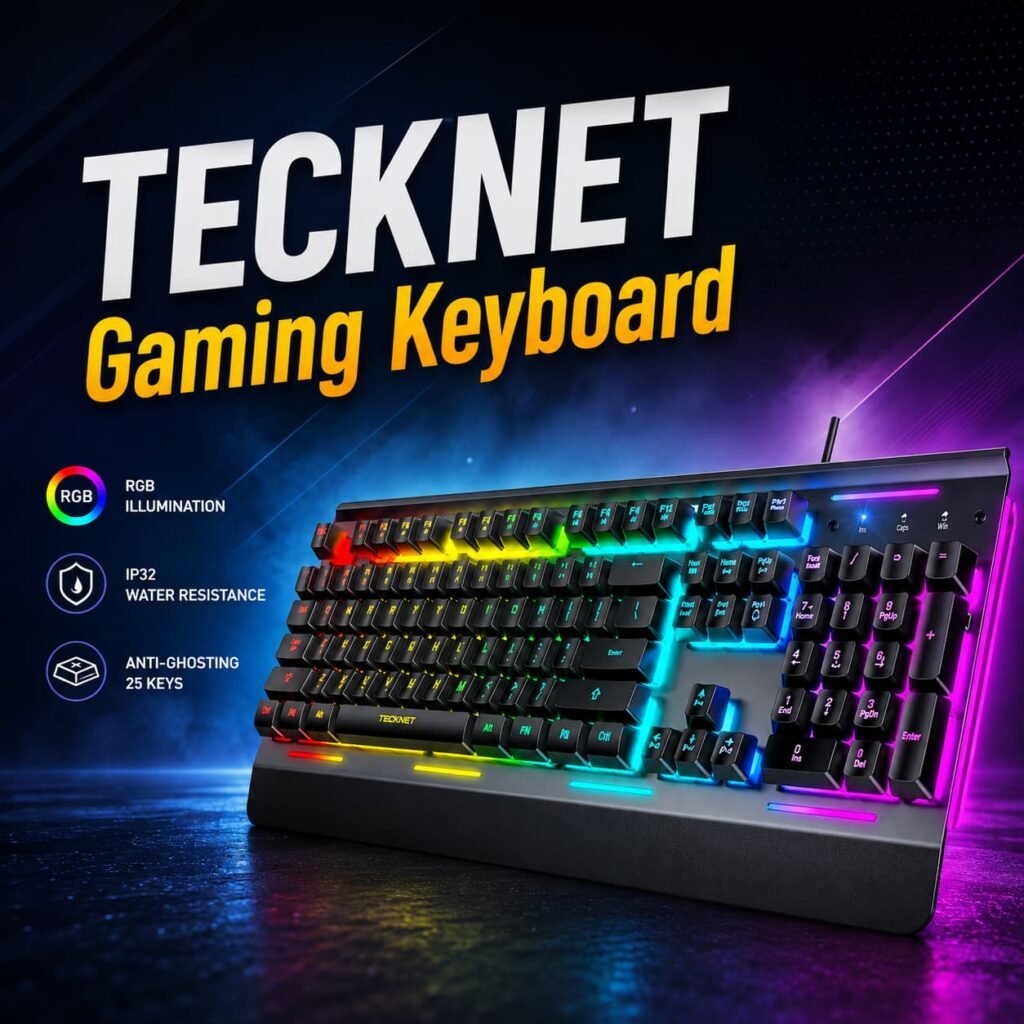
This in-depth TECKNET Gaming Keyboard review covers everything — real switch mechanics, RGB performance, anti-ghosting truth, build quality, and who this keyboard is (and isn’t) made for. Let’s cut through the marketing and find out what you’re really getting.
What Is the TECKNET Gaming Keyboard?
The TECKNET Gaming Keyboard is a wired USB membrane keyboard with RGB backlighting, an all-metal top panel, and a built-in wrist rest. It comes in full-size (105/108-key) layouts and is primarily sold on Amazon in the US and UK markets.
TECKNET markets it as a “gaming keyboard” with “mechanical feel” — but there’s a lot to unpack in that claim, which we’ll get into shortly.
Quick Specs at a Glance:
| Feature | Specification |
|---|---|
| Switch Type | Membrane (rubber dome) |
| Keys | 105–108 keys (full-size) |
| Anti-Ghosting | 25–26 keys |
| RGB Zones | 15-zone illumination |
| Lighting Modes | 7 modes, 4 brightness levels |
| Polling Rate | 125Hz |
| Water Resistance | IP32 (spill-resistant) |
| Wrist Rest | Integrated / built-in |
| Tilt Angle | 7°–8° ergonomic |
| Connectivity | USB wired |
| Multimedia Keys | 12 (Windows only) |
TECKNET Gaming Keyboard RGB & LED Lighting – How Good Is It Really?
The RGB lighting is genuinely one of the strongest points of this keyboard. You get 15 lighting zones with 7 illumination modes and 4 brightness levels, all controllable directly from the keyboard using FN key shortcuts — no software required.
You can choose from 15 RGB color modes to set the perfect ambiance, and the keyboard enters sleep mode after 30 minutes of inactivity. Pressing any key or FN+PgDn wakes it back up. Amazon
The LED shines through the keycap legends (the letters and symbols), meaning the light comes from inside each key — so the lettering never fades or peels off over time. This is a big deal for longevity, especially on budget boards where painted-on legends start wearing off after a few months.
How to control the RGB:
- FN + PgDn — Toggle backlight on/off
- FN + ↑ / ↓ — Adjust brightness
- FN + ← / → — Adjust breathing speed
- FN + Insert/Home/PgUp/Delete/End — Switch lighting modes
One real complaint from users: the backlight turns off after five minutes of inactivity, and there’s no way to keep it permanently on — which some users find frustrating when they need to see the keys. Amazon UK
Build Quality – Does the All-Metal Panel Actually Help?
Yes, it does. The all-metal top plate is a standout feature for this price range. Most keyboards under $30–40 use full plastic construction, which flexes and feels hollow.
The keyboard has great heavy construction with an all-steel frame — it genuinely feels solid and premium, more so than you’d expect at this price point. Amazon UK
The keycaps are made from ABS plastic, which is standard at this tier. ABS keycaps will show shine after 6–12 months of heavy use Level Up Blogs, which is a normal trade-off for budget keyboards.
The cable is a braided USB connection at approximately 1.5m length. Some long-term users report cable fraying after around 18 months Level Up Blogs, so it’s worth managing cable stress near the connector point.
The Switch Truth – Is the TECKNET Gaming Keyboard Actually Mechanical?
This is where you need to pay close attention before buying.
The TECKNET Gaming Keyboard uses membrane (rubber dome) switches — not mechanical switches. The “mechanical feel” language in marketing is misleading.
The switches require approximately 65g actuation force with a 2.5mm actuation point and 4mm total travel. They’re quiet but lack the tactile feedback and longevity of actual mechanical switches. Vivid Repairs
Here’s what that means in plain English:
- Mechanical keyboards have individual spring-loaded switches under each key. You feel a clear tactile bump (or click) when the key registers — which happens before the key fully bottoms out. This means faster, lighter keystrokes.
- Membrane keyboards use a rubber dome sheet. The key must travel all the way down to register a press, which gives a softer, “mushy” feel and slightly slower response.
TECKNET’s low-profile membrane switches provide roughly 80% of a mechanical keyboard’s tactile feedback at about 30% of the noise level Newegg — which is honestly a fair trade-off for shared spaces like dorm rooms or offices.
Bottom line: If you’ve never used a mechanical keyboard, you probably won’t notice. If you’re coming from a Cherry MX or Gateron switch board, the difference will be obvious.
Anti-Ghosting Performance – What Does 25-Key Anti-Ghosting Actually Mean?
Anti-ghosting is one of the most misunderstood specs in gaming keyboards. Let’s break it down.
Ghosting happens when you press multiple keys at once and the keyboard fails to register all of them — or worse, registers a “ghost” key you didn’t press. This is caused by the keyboard’s internal matrix design.
The TECKNET Gaming Keyboard offers 25-key anti-ghosting, meaning up to 25 keys can be pressed simultaneously and all will register correctly.
Testing with simultaneous WASD + Shift + Ctrl + Q + E + R inputs showed every key registered. For normal gaming, even complex MMO ability rotations, you will never hit the 25-key limit. Vivid Repairs
For context: most competitive FPS players rarely press more than 5–6 keys at once. 25-key anti-ghosting is more than sufficient for 99% of gaming scenarios.
Beyond the anti-ghosting limit, ghosting can occur with complex key combinations — but this is rare in real-world gaming. Level Up Blogs
Polling Rate – Does 125Hz Matter for Gaming?
The TECKNET Gaming Keyboard has a 125Hz polling rate.
Polling rate is how often the keyboard reports its position to your PC. 125Hz means it updates 8 times per second (every 8 milliseconds). Higher-end gaming keyboards often run at 1000Hz (1ms updates).
The 125Hz polling rate is standard for budget boards — that’s one update every 8 milliseconds. Vivid Repairs
Is this a problem? For casual gaming, no. For competitive esports titles like CS2, Valorant, or Apex Legends at a high level, it is a measurable disadvantage compared to 1000Hz keyboards. But at this price range, 125Hz is expected and fair.
Ergonomics & Comfort – Can You Use It for Long Sessions?
The keyboard features an ergonomic 7-degree input angle and a scientifically designed stepped key layout. The integrated wrist rest is designed to maintain a natural hand position and reduce hand fatigue. Amazon
Real-world feedback is mixed on the wrist rest. The included wrist rest helps but is thin foam rather than proper cushioning Vivid Repairs — it’s better than nothing, but heavy typists may want a separate padded wrist rest for extended sessions.
Initial stiffness in the membrane switches can lead to finger tiredness after 30+ minutes of continuous typing, according to Reddit user reports. Level Up Blogs
Water Resistance – IP32 Rating Explained
The TECKNET Gaming Keyboard has IP32 spill resistance, with four drainage holes in the wrist rest designed to channel liquid away from internal components, so an accidental drink spill won’t instantly kill your keyboard. TECKNET
IP32 means it’s protected against solid objects over 2.5mm (like fingers) and light splashing of water. It is not waterproof — don’t submerge it. But for everyday desk accidents, it’s a solid safety net.
Who Is the TECKNET Gaming Keyboard Best For?
✅ Buy it if you are:
- A casual gamer playing single-player games, MMOs, or non-competitive multiplayer
- A student or first-time PC builder on a tight budget
- Someone who wants RGB aesthetics without spending $80–150
- Working in a shared space where quiet typing matters
- Upgrading from a basic $10–15 office keyboard
❌ Skip it if you are:
- A competitive FPS/Battle Royale player (CS2, Valorant, Apex) where input speed matters
- A heavy daily typist who needs tactile feedback for comfort
- Looking for a keyboard that will last 5+ years under heavy use
- A Mac user (multimedia keys are Windows-only)
TECKNET Gaming Keyboard vs. Competitors
| Keyboard | Switch Type | Anti-Ghost | Polling Rate | Price Range |
|---|---|---|---|---|
| TECKNET RGB Gaming | Membrane | 25 keys | 125Hz | $25–$40 |
| Redragon K552 | Mechanical (Outemu Blue) | NKRO | 1000Hz | $35–$45 |
| Logitech G213 | Membrane | 26 keys | 1000Hz | $60–$70 |
| Corsair K70 | Mechanical (Cherry MX) | Full NKRO | 1000Hz | $130–$160 |
The Redragon K552 is the most common alternative recommended on Reddit’s r/MechanicalKeyboards for buyers who want to step up to real mechanical switches without a big budget jump.
Common Issues & User Complaints (Honest Take)
Based on real Amazon and Reddit feedback, here are the most common complaints:
- Backlight auto-sleep — The RGB turns off after inactivity, which annoys users who want ambient lighting.
- No software customization — You can’t remap keys or customize individual LED zones via software; everything is hardware-controlled only.
- No Mac multimedia key support — The 12 media keys are Windows-exclusive.
- Membrane feel — Users upgrading from mechanical boards will miss the tactile feedback.
- No USB passthrough — You can’t plug in a mouse or phone charger through the keyboard.
Where to Buy the TECKNET Gaming Keyboard
The best and most reliable place to buy the TECKNET Gaming Keyboard is directly through Amazon. You get fast shipping, buyer protection, hassle-free returns, and access to verified customer reviews before purchasing.
TECKNET also offers lifetime support on products purchased through Amazon — but registration is required after purchase to activate it.
👉 Check Current Price & Buy on Amazon →
Why buy from Amazon:
- Fulfilled by Amazon — fast and reliable delivery
- Easy returns if the product doesn’t meet expectations
- Verified buyer reviews so you can see real user feedback
- Frequent discounts and lightning deals on gaming peripherals
- Secure checkout with buyer protection
Pro Tip: Check the Amazon listing for bundle deals — some listings include a matching TECKNET gaming mouse at a discounted combo price.
Final Verdict – Should You Buy the TECKNET Gaming Keyboard?
Rating: 7.5/10 for Budget Buyers
The TECKNET Gaming Keyboard is a well-built, visually impressive budget keyboard that punches above its price for casual gamers and general PC users. The all-metal panel, bright RGB lighting, and IP32 spill resistance make it feel more premium than its price suggests.
However, it’s important to go in with realistic expectations. This is a membrane keyboard with a 125Hz polling rate. It will not outperform a mechanical board in competitive gaming scenarios. But for the price, it delivers genuine value — especially if you’re a first-time builder, a student, or a casual gamer who just wants a good-looking setup that works reliably.
If your budget allows even $10–15 more, consider a true mechanical option like the Redragon K552. But if you want an honest, solid LED gaming keyboard under $40? The TECKNET Gaming Keyboard earns its place.
Frequently Asked Questions About the TECKNET Gaming Keyboard
Q: Is the TECKNET Gaming Keyboard mechanical or membrane? It is a membrane keyboard. TECKNET uses “mechanical feel” in marketing, but the switches are rubber dome — not individual mechanical switches.
Q: How do I turn on the RGB on the TECKNET Gaming Keyboard? Press FN + PgDn to toggle the backlight. Use FN + ↑/↓ to adjust brightness and FN + Insert/Home/PgUp/Delete/End to switch lighting modes.
Q: Is the TECKNET Gaming Keyboard good for FPS games like CS2 or Valorant? It works for casual play, but the 125Hz polling rate and membrane switches mean you’ll have a slight disadvantage in high-level competitive play compared to mechanical keyboards with 1000Hz polling rates.
Q: Is the TECKNET Gaming Keyboard compatible with Mac? The keyboard connects via USB and works for typing on Mac. However, the 12 multimedia shortcut keys are not compatible with macOS.
Q: Does the TECKNET Gaming Keyboard have software? No dedicated software. All lighting modes and keyboard settings are controlled through hardware shortcuts using the FN key.
Q: Is the TECKNET Gaming Keyboard waterproof? It is IP32 spill-resistant with drainage holes, but it is not fully waterproof. It will survive a drink spill but should not be submerged in water.
👉Check Out Another ASUS Laptop
Thanks For Reading🖤